


Three Ways MDM Streamlines Device Deployment
.png)
Device deployment is more complex than FedExing the right device to the right person at the right time. Best practice device deployment addresses the realities of how businesses and people actually work and the intricacies of staying secure, scalable, and productive in an ever-evolving world.
Here’s where mobile device management (MDM) is your best buddy. It’s not a panacea, but it's the next best thing: a grab-bag of policies, tech, and tools that’ll streamline and optimize how you deploy devices and save you time, effort, and headspace. Let’s take a look.
Hold Up, Why Does Device Deployment Need Optimizing?
If you’ve ever spent two weeks in a dusty basement unboxing, provisioning, re-boxing, and licking stamps, ready to send devices off to new hires, you’ll know the answer. Have you ever gone loopy manually configuring endless laptops or tried to locate deployed devices that need an OS update or service recall? You get it.
Manually deploying devices comes with a range of challenges and difficulties. Take a look:
Challenges of Manual Device DeploymentChallengeDescriptionStaff Time and EffortManually configuring, provisioning, securing, and despatching devices is time-consuming, especially when required in bulk, and is difficult to scale. Onboarding and productivity can be affected.Human ErrorThe more humans are involved, the more human error creeps in. This could result in misconfigured devices, leading to higher security risks, an increase in user help requests, and more time spent troubleshooting. When IT skill levels vary, so too will the results.StandardizationManual application can lead to inconsistencies of protocols and configurations, leading to security vulnerabilities or non-compliance with cybersecurity frameworks. Reduced IT ProductivityTime taken up with manual deployment means less time and expertise for other IT operational or strategic tasks. You’re not getting the best out of your IT team.Platform LimitationsIT staff experience or preference levels may restrict the platforms available to staff, e.g., if your IT lead is comfortable only with Windows. Un-DeployingManual un-deploying may open you up to security vulnerabilities as ex-hire accounts may not be shut down promptly.Return on InvestmentSlow deployment means a longer lead time to full performance, and your wage budget is spent on tasks that could be automated.
Streamlining Device Deployment: Three Ways MDM Makes It Effortless
MDM (Mobile Device Management) is a powerhouse of automation, taking the burden off your shoulders once you've established the right protocols and configurations for your fleet. Acting as your control center, MDM handles the task of configuring, deploying, managing, and monitoring devices, all while ensuring they remain secure and aligned with your business objectives.
Let's explore how MDM simplifies the device deployment process:
1. Device Configuration and Provisioning
Setting up devices correctly for their intended recipients can be time-consuming and meticulous. MDM comes to the rescue by allowing you to pre-define settings, policies, and profiles that can be automatically applied across your entire fleet or new devices with just a few clicks. This versatile deployment configuration covers various business operations, including recruitment, security, productivity, and compliance.
Here’s just a sample:
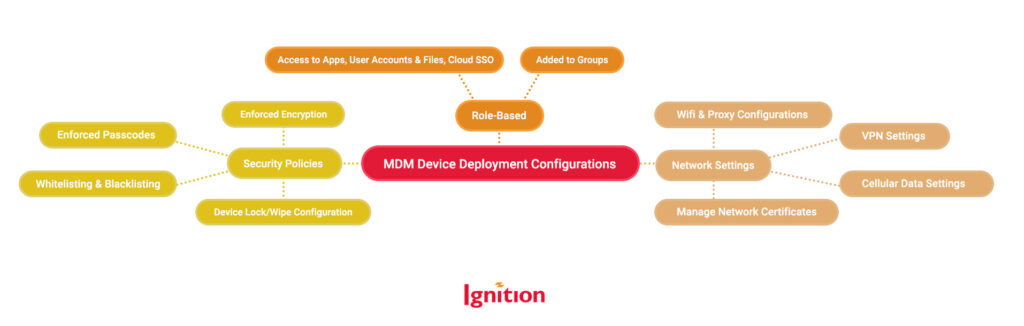
2. Effortless Deploying Changes and Updates
Change is inevitable, but managing it across a fleet of devices shouldn't be a hassle. MDM simplifies the process by enabling you to define and apply changes seamlessly to relevant devices over the air. Gone are the days of recall and manual adjustments. Whether it's a major strategic shift like migrating to the cloud or minor operational tweaks like introducing a new app or adjusting backup schedules, MDM ensures your devices are always deployed in an optimal manner.
3. Simplified Device Assigning and Spares Management
Device deployment encompasses not only assigning and reassigning devices throughout their lifecycle but also securely storing them when not in use. Manual management in this area, particularly within a remote workforce, can lead to various issues, including the presence of private or sensitive data on unassigned devices, security vulnerabilities from lingering user accounts, difficulty in locating devices for reassignment, and delays in uninstalling irrelevant apps.
MDM comes to the rescue once again by consolidating all the details of your fleet into an IT asset inventory. This centralized and searchable database captures the information, location, and status of every device. With this comprehensive overview at your fingertips, you can easily assign, unassign, reassign, and recall devices, swiftly close down old accounts, and take immediate action if a device goes missing. Additionally, MDM allows you to track device locations on a map, ensuring safe transfers between users.
With MDM, device deployment becomes a seamless and efficient process, saving you time, mitigating risks, and empowering you to focus on driving your business forward.
Struggling with Device Deployment? Let Us Restore Your Sanity!
When it comes to streamlining device deployment and unleashing the full potential of your business, we're huge fans of MDM (spoiler alert: it's our specialty). It's like having a magical asset that keeps on giving. From simplifying device setup to fortifying security measures, MDM is here to rescue your team’s sanity. If you're even remotely intrigued by the wonders of MDM, don't hesitate to give us a call. We'd be thrilled to chat your ears off about it (trust us, that's a good thing)!
Ignition is Silicon Valley’s best (and friendliest) IT security, compliance, and support team. Contact us now – chatting about IT support and cybersecurity is our favorite thing to do!

Ignition (Laramie M) was super responsive -- I got an appointment right away and the issue was resolved in under 15 minutes. What could have been a frustrating process was seamlessly resolved. Thank you! Your company is very popular in our office!


